














Syinix Smart Remote Control – Black
Condition: Please confirm the exact unit’s condition with us.
Warranty: Ask for the warranty terms for this item before ordering.
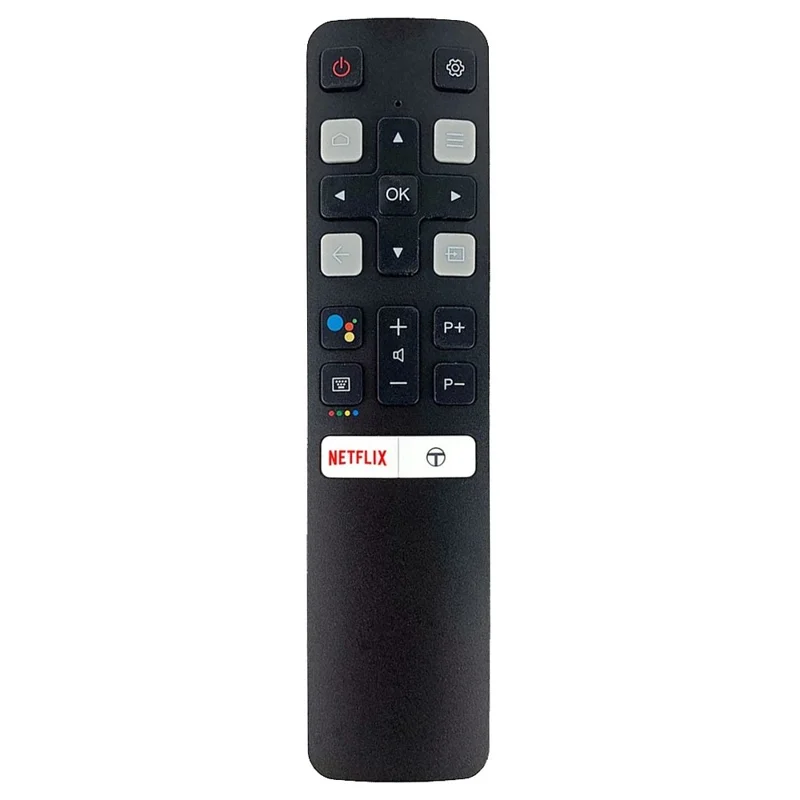
Ideal for All Syinix Smart TVs – Fully compatible with Syinix Smart TVs of all sizes.
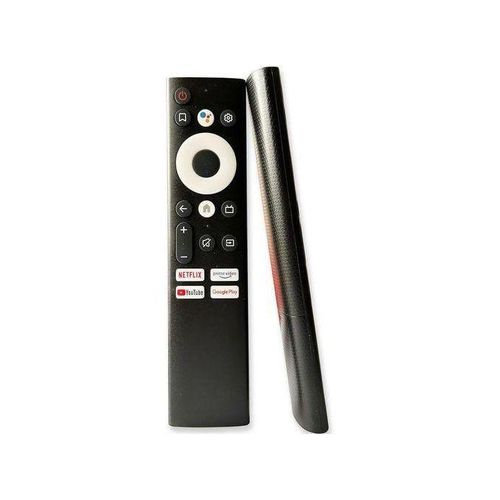
Multi-Function Control – Easily operate your TV and decoder: power on/off, settings, channel selection, and volume adjustment.
Dedicated Streaming Buttons – Quick access to Netflix, YouTube, Prime Video, and Google Play at the touch of a button.
User-Friendly Design – Each key is clearly labeled for effortless navigation and convenience.
Details
Ideal for All Syinix Smart TVs – Fully compatible with Syinix Smart TVs of all sizes.
Multi-Function Control – Easily operate your TV and decoder: power on/off, settings, channel selection, and volume adjustment.
Dedicated Streaming Buttons – Quick access to Netflix, YouTube, Prime Video, and Google Play at the touch of a button.
User-Friendly Design – Each key is clearly labeled for effortless navigation and convenience.
Highlights
Delivery & Returns
You may also like


Syinix Smart Remote Control – Black Buying Guide
Syinix Smart Remote Replacement in Kenya
The Syinix Smart Remote Control is a replacement remote for customers who need a simple way to control a compatible Syinix smart TV. It is useful when the original remote is lost, broken, water damaged, or no longer responding well. A working remote helps you control power, volume, menu, source, navigation, apps, and settings without struggling with the TV buttons.
This product is especially helpful for customers who already own a Syinix smart TV and want to restore normal daily control. Before buying, confirm that your TV model and the remote features you need match this product. A remote can look similar to the original one but still miss some functions, so compatibility should come before appearance.
Who Should Buy This Syinix Remote?
This Syinix smart remote is suitable for homes, offices, hotels, shops, schools, rental houses, and entertainment rooms where a compatible Syinix TV is used often. It is a practical choice if the old remote has weak buttons, a damaged battery cover, poor response, or missing keys. It can also work well as a spare remote for families or businesses where remotes are frequently misplaced.
Customers who use streaming apps, HDMI devices, decoders, TV boxes, or normal TV channels need a remote that can move around the TV interface easily. If you use the TV every day, replacing the remote can make the television feel usable again without buying a new TV.
Syinix Remote Compatibility Checklist
| What to Check | Why It Matters | Buyer Tip |
|---|---|---|
| TV brand | The remote is meant for compatible Syinix TVs. | Confirm your TV is Syinix before ordering. |
| TV model number | Different Syinix TVs can use different remotes. | Check the sticker at the back of the TV. |
| Old remote layout | The button layout helps confirm close compatibility. | Send a photo of your old remote if available. |
| Smart TV features | Smart TVs may need home, back, source, and navigation controls. | Confirm the buttons you use most often before buying. |
What This Remote Helps You Do
A compatible Syinix replacement remote helps with the controls most customers need every day. These include turning the TV on and off, changing volume, opening the menu, moving through settings, changing input source, and navigating the smart TV interface. If your TV is connected to a decoder, gaming console, soundbar, or TV box, the source button is important because it helps you switch between devices.
For smart TV use, navigation buttons are very important. They help you move through apps, confirm selections, go back, and return to the home screen. A remote that controls the TV smoothly saves time and makes streaming easier for the whole family.
Before You Buy: Confirm These Details
Before ordering this Syinix remote, check the TV model number. You can usually find it on a sticker at the back of the TV. If the old remote is still available, take a clear photo of the front and back. If there is a model code on the remote, include it when asking for help. These small details reduce the chance of buying a remote that works only partly.
Also think about the features you use most. Some customers only need power, volume, and source control. Others need app navigation, smart TV settings, YouTube, Netflix, or HDMI switching. The better you explain your use, the easier it is to confirm whether this remote is the right replacement.
When This Remote Is a Good Choice
This remote is a good choice when the TV itself is working well but the remote is the problem. It is also a good option when the original remote has worn-out buttons or responds only when pressed very hard. If the TV is used in a shared space, a replacement remote can prevent daily frustration and make the TV easier for everyone to use.
It is also suitable if you want a spare remote. In many homes and businesses, remotes disappear easily. Having a spare can be useful, especially when the TV is used by children, guests, workers, or many family members.
When to Ask Before Ordering
Ask before ordering if your Syinix TV is a newer smart TV, if the old remote had special buttons, or if you need a specific function such as voice, app shortcuts, Bluetooth pairing, or advanced smart controls. It is better to confirm before paying than to buy a remote that does not match your daily needs.
You should also ask if you are buying for someone else. Do not rely only on the screen size. Two Syinix TVs can have the same screen size but different remote requirements. The TV model number and a photo of the old remote are more useful than saying the TV is 32 inch, 43 inch, or 55 inch.
Buying Checklist Before You Pay
- Confirm your TV is a Syinix TV.
- Check the TV model number at the back of the TV.
- Compare the old remote shape and button layout if available.
- Confirm the main buttons you need: power, volume, source, menu, home, and navigation.
- Ask about compatibility if your TV uses special smart features.
- Buy suitable batteries if you do not have fresh ones at home.
Common Remote Problems This Can Solve
A replacement remote can help when the old remote no longer sends a strong signal, when some buttons respond and others do not, or when the remote only works from very near the TV. It can also help when the battery contacts are damaged, the plastic body is cracked, or the remote has been affected by water. If the TV screen, ports, and power are working normally, replacing the remote is often the simplest first step.
However, a replacement remote will not fix a TV with a damaged sensor, software problem, power board issue, or broken screen. If your TV does not respond to any remote, even after trying fresh batteries and clearing the sensor area, ask for advice before buying. This helps you avoid spending money on the wrong solution.
Care Tips for Longer Remote Life
- Use fresh batteries and replace weak batteries early.
- Keep the remote away from water, tea, soda, and cooking areas.
- Do not leave batteries inside for months if the remote is not in use.
- Clean battery contacts gently if you notice corrosion.
- Avoid dropping the remote on hard floors.
- Keep the TV sensor area clear for better response.
Why Buy from Mubarak Tech?
Mubarak Tech helps customers compare TV remote replacements and choose practical options for everyday use. The goal is to help you buy a remote that can actually control your TV, not just one that looks similar. If you are unsure, send your TV model number or old remote photo before buying.
You can compare more options in the TV remotes in Kenya category. If you are comparing brand-specific guides, you can also read the TCL TV remote price in Kenya guide or the Samsung TV remote price in Kenya guide.
After You Receive the Remote
After receiving the remote, insert fresh batteries and test the main buttons first. Try power, volume, source, menu, back, home, and navigation. If the remote does not respond, check that the batteries are inserted correctly and that nothing is blocking the TV sensor. Testing it early helps you confirm whether it matches your TV.
If the remote works on basic buttons but one smart function is missing, check whether that function depends on the TV model or special pairing. Some replacement remotes are meant for normal control, while original smart remotes may support extra features. This is why confirming compatibility before buying is important.
Who This Remote May Not Suit
This remote may not be the best choice if your TV needs a very specific original remote with voice pairing, special app shortcuts, or Bluetooth-only control. It may also not suit customers who are not sure whether their TV is Syinix or another brand. If you are unsure, confirm the TV model first. A short check before ordering can save time and help you buy the correct replacement remote.
FAQs About Syinix Smart Remote Control
Can this Syinix remote work on every Syinix TV?
No. Syinix TVs can use different remote types. Confirm your TV model number or send a photo of your old remote before buying.
Is this remote good for a smart TV?
It is listed as a smart remote, but compatibility still matters. Confirm the TV model and the buttons you need for apps, source, menu, and navigation.
What should I check before buying?
Check your TV model number, old remote layout, required buttons, battery type, and whether you need any special smart TV functions.
Can I buy it as a spare remote?
Yes. It can be useful as a spare remote for homes, offices, hotels, shops, and shared TV spaces if it is compatible with the TV.
Where can I compare other TV remotes?
You can browse the Mubarak Tech TV remotes category to compare Syinix, TCL, Samsung, Vitron, and other replacement remotes.
Choose this Syinix Smart Remote Control if you need a practical replacement for a compatible Syinix TV. Confirm compatibility first, then buy the remote that gives you the everyday controls you need.
Syinix Smart TV Remote Replacement in Kenya
The Syinix Smart Remote Control is a replacement remote for selected Syinix Smart TVs. It is useful for customers in Kenya who need to replace a lost, broken, or weak Syinix TV remote and want simple control for power, volume, channels, settings, and streaming shortcuts.
Who Should Buy This Syinix Remote?
This remote is suitable for home users, offices, hotels, schools, and entertainment rooms using compatible Syinix Smart TVs. It is also useful as a spare remote if your main remote is already worn out or slow to respond.
Before You Buy
- Check that your TV is a compatible Syinix Smart TV.
- Compare the button layout with your old remote if available.
- Send your TV model or old remote photo on WhatsApp if you need help.
- Confirm availability before visiting the shop or placing an order.
Compare More TV Remotes
You can browse more TV remotes in Kenya, compare the Vitron Smart Android TV Remote, or read our TV remote replacement Nairobi page if you are choosing a replacement remote near Nairobi CBD.
Frequently Asked Questions
Can this replace my old Syinix TV remote?
Yes, it can replace selected compatible Syinix Smart TV remotes. Confirm your TV model before buying if you are unsure.
Does it support streaming buttons?
The product description lists dedicated streaming buttons for quick access to common apps where supported by the TV.
Can I get help before buying?
Yes. Send your TV model or a clear photo of your old remote to MubarakTech on WhatsApp for guidance.
Order via WhatsApp
We will include it in your order message.